Dental Website Appointment Requests Not Becoming Bookings? Check the Front-Desk Handoff
Your “Book an appointment” button may be promising something your form cannot deliver. If the visitor chooses a preferred day, presses Submit and sees “You’re all set”, they can reasonably believe the appointment is booked. Reception may see nothing more than a request waiting in an inbox.
Before we add more dental appointment request follow-up, let’s make the promise, the front-desk action and the confirmation match. That is how we turn a form submission into a clear next step, without pretending GHL is your practice scheduler.
Make the request page tell the truth
| Where the patient looks | What we would write |
|---|---|
| Button | Request an appointment |
| Before submission | Tell us your preferred day. Our front desk will check availability; submitting this form does not reserve a time. |
| After submission | We have your request. Reception will contact you using your selected preference during our stated office hours to agree an available appointment. |
Use the practice’s actual response policy and monitored contact route. Keep the form administrative: contact details and a scheduling preference, not a place to collect symptoms, treatment photos or clinical history. Your practice-approved urgent-care instructions should be separate from routine requests.
Help reception finish the conversation
EXAMPLE RECEPTION MESSAGE
Hello [First name], this is the front desk at [Practice]. We received your appointment request. Would you prefer us to call you, or send available appointment options through our approved booking channel?
If the person chooses a call, reception agrees a callback and records it. If they want options, staff checks the approved scheduler and offers suitable availability. We do not send a general homepage link and make them start again.
Use GHL to catch the request that is still waiting
The saved workflow below waits fifteen minutes, then checks a booking marker. A marked record exits. A record without the marker creates a front-desk review task. The interval is an example office review cadence, not a clinical response standard.
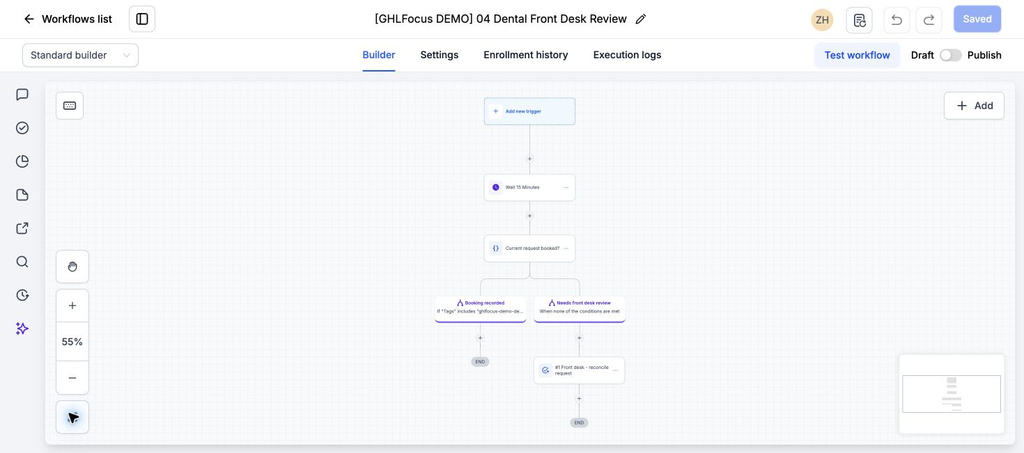
The marker does not discover a booking by itself. Before using this process, we’ll connect a reliable scheduler update for the specific request, or define a staff verification step. A general contact tag left from last year must not close today’s request. If that appointment-specific connection is unavailable, keep a human scheduler check before any follow-up.
Keep three outcomes separate
| Outcome | What the person should receive |
|---|---|
| Request received | A clear explanation that the time is not reserved yet. |
| Callback agreed | Who will call, which number they will use, and a realistic agreed window. |
| Appointment confirmed | The verified date, time and practice-approved preparation or confirmation route. |
This is an inactive administrative example, with no entry trigger, assigned staff or scheduler integration; nobody has been contacted. The reception message above is proposed copy, not an automated send already built into it. We’ll agree approved tools, access and communication permissions with the practice before connecting any patient information.
Test the confusing case, not just a new form
Submit an internal test request, book it through the actual scheduler, and check that the open request closes. Then try a preferred time that is unavailable and an appointment arranged by phone. The process should offer an honest alternative and stop chasing a completed booking in both cases.
Measure unresolved requests at the end of each office review period and requests that reach a confirmed appointment. A successful form submission is only the beginning.
Want a simpler route from request to booking?
If your GoHighLevel appointment-request journey loses the front-desk handoff, see our $200 workflow audit. It reviews the agreed path and provides test evidence and prioritized findings; repairs are separate. Related guide: dental receptionist guide.