Dental No-Shows and Cancellations: Who Owns the Rebooking Follow-Up?
Tomorrow’s appointment reminder cannot recover yesterday’s missed appointment. Once a visit is cancelled or marked as a no-show, reception needs a different job: find out whether the person wants help arranging another visit, and avoid contacting someone who already has one.
Dental no-show rebooking should feel like an offer of practical help, not a reprimand. We’ll start with the changed appointment, check the scheduler, and make the next response easy.
Start with the appointment, not a blanket patient list
Your review record needs the affected appointment reference, its current status, any linked replacement booking and the staff member responsible. A cancellation may already include a new time. A no-show may need a different practice-approved response. Do not treat both as permission for the same automatic message.
| Scheduler shows | Reception does |
|---|---|
| Cancelled and already rescheduled | Verify the new booking, close this rebooking task and leave its confirmation process intact. |
| Cancelled with no replacement | Offer help choosing another time using the approved contact preference. |
| No-show | Check the practice’s administrative policy and any relevant staff instructions before contacting the person. |
| Uncertain or inconsistent status | Resolve the record with the practice team before any follow-up. |
Give the person a small, useful choice
PROPOSED REBOOKING MESSAGE
Hello [First name], this is reception at [Practice]. Would you like help arranging another appointment? You can reply CALL ME, or tell us whether mornings or afternoons usually suit you. We’ll check availability with you.
Use that wording only where approved for the person and channel. Keep clinical details out of an ordinary message. If they reply “afternoons”, reception offers verified options through the approved booking process. A preference is not a reservation, and silence is not agreement to a new time.
Let GHL flag the unresolved record
Our saved example waits fifteen minutes, checks a replacement-booking marker, and creates a reception task if the marker is missing. The check is useful only when the marker accurately represents the affected appointment.
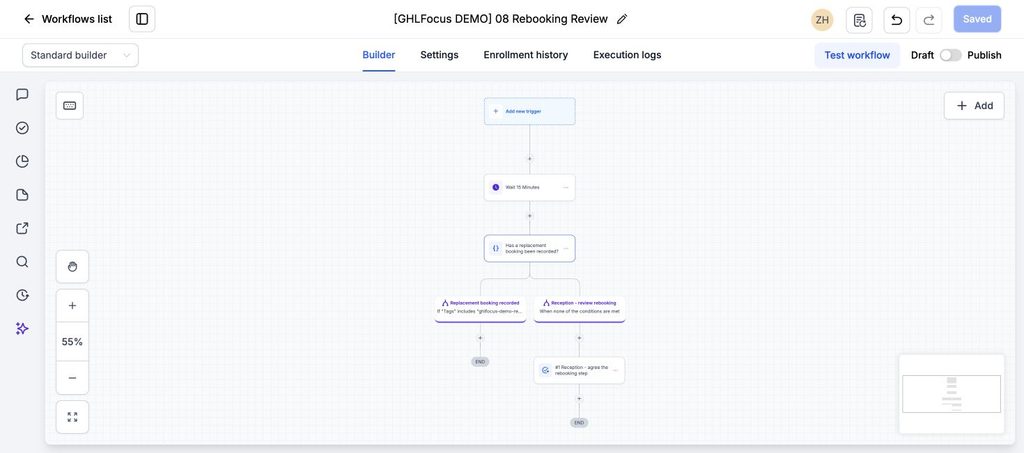
Before connecting it, we’ll define how the practice scheduler supplies that result. If the appointment lives in GHL, its Appointment Status trigger offers status and calendar filters. That does not mean a change in an external practice system automatically reaches GHL; the connection still needs verification.
Stop when reception has an answer
Close the open rebooking request when a replacement is confirmed or the person declines further scheduling help. If a callback is agreed, give it an owner and follow the agreed timing. Avoid starting a second sequence because the original appointment status is processed twice.
The screenshot is an inactive administrative check, not a working patient-messaging integration. It has no entry trigger or scheduler connection, and the message above is proposed copy. We’ll agree approved data handling, access and communication settings with the practice before using patient records.
Prove that a phone booking stops the chase
With internal test records, cancel and immediately rebook one appointment, arrange another by phone, and leave a third unresolved. Only the unresolved record should remain in the review queue. Also test two appointments for the same contact so closing one does not wrongly clear the other.
Measure appropriate rebooking requests resolved and replacement appointments confirmed. Do not report every cancellation as a recoverable booking or claim that follow-up removes all no-shows.
Need a clearer dental inquiry and rebooking process?
If the rebooking journey runs in GoHighLevel and ownership or stop conditions are unclear, see our $200 workflow audit. We check the agreed path and report the gaps; changes are quoted separately.