Roofing Follow-Up Automation: Can Your Existing CRM Do the Job?
A reminder can go out exactly on time and still give a homeowner no reason to reply. “Just checking in” asks them to restart the conversation. A better roofing follow-up automation asks one useful question about the estimate and makes answering it easy.
You may already have the tools to do this. The question is whether your CRM can send the right message, recognise a response and stop the next reminder. Here is the sequence we built in GHL.
Give the homeowner something specific to answer
We start with an estimate that is still open and appropriate to follow up. Instead of sending the PDF again, the first SMS offers three ways into the conversation:
FIRST SMS IN THE WORKFLOW
Hi {{contact.first_name}}, this is the team at [Roofing Company]. Which part of your roofing estimate would you like us to explain: the work included, the timing, or something else? Reply here and we will help. Reply STOP to opt out.
That question lowers the effort needed to reply. Someone who is unsure what the estimate includes can say “the work included” instead of writing a long explanation. Your estimator now has a specific question to answer, rather than another silent lead to chase.
Send one follow-up, but stop when the conversation starts
The actual workflow below contains two SMS actions separated by a two-day wait. We enabled Stop on Response and disabled ordinary re-entry. When a homeowner replies to a message from this workflow, GHL ends their sequence so the next generic reminder does not compete with your estimator’s conversation.
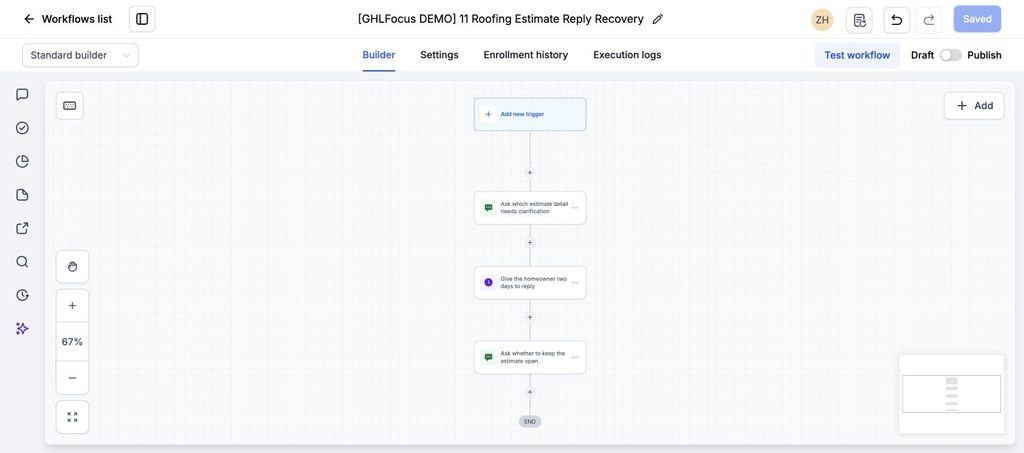
If no response arrives before the delay ends, the second message gives the homeowner a simple decision:
FINAL SMS IN THE WORKFLOW
Hi {{contact.first_name}}, should we keep your roofing estimate open, or pause follow-up for now? Reply KEEP or PAUSE and our team will take it from there. Reply STOP to opt out.
KEEP is an opening for your estimator to agree the next step. PAUSE tells your team to leave the conversation alone. These are reply prompts, not an AI interpretation of intent; your team still reads the answer and records the outcome. The sequence ends after this message rather than chasing indefinitely.
Can your current CRM do the same job?
Check three things in your existing system: can it identify the current estimate, stop this sequence on a reply, and remove someone when the estimate is accepted or a review is booked? If it can, configure that first. If GHL supplies a missing step, connect the estimate status as well as the contact record.
Our example is inactive and has sent no messages. Before using it, we must connect the estimate event and booked/accepted/declined exits, verify the sender and contact permissions, and choose an appropriate sending window. A booking made elsewhere will not stop this workflow merely because Stop on Response is enabled.
Measure conversations recovered, not reminders sent
Track how many eligible open estimates receive the first message, how many produce a meaningful reply, and how many replies lead to an agreed review or next decision. That will tell you whether the automation is reopening useful conversations. Message volume alone will not.
Further reading: HighLevel’s workflow settings and Stop on Response guide.
Losing roofing inquiries between the call and the inspection?
If you keep GoHighLevel as your CRM and want the follow-up journey checked, see our $200 workflow audit. It reviews the agreed path and identifies gaps; repairs are separate.