GoHighLevel AI Agent Setup Cost: Chatbot, Voice AI, Lead Response and Human Handoff
The GoHighLevel AI agent setup cost is not one number. You are paying for platform usage, the implementation work and the testing needed before the agent speaks to real leads.
The real problem is not the prompt. It is what the agent can answer, what it should never answer, where the contact goes next and when a person takes over.
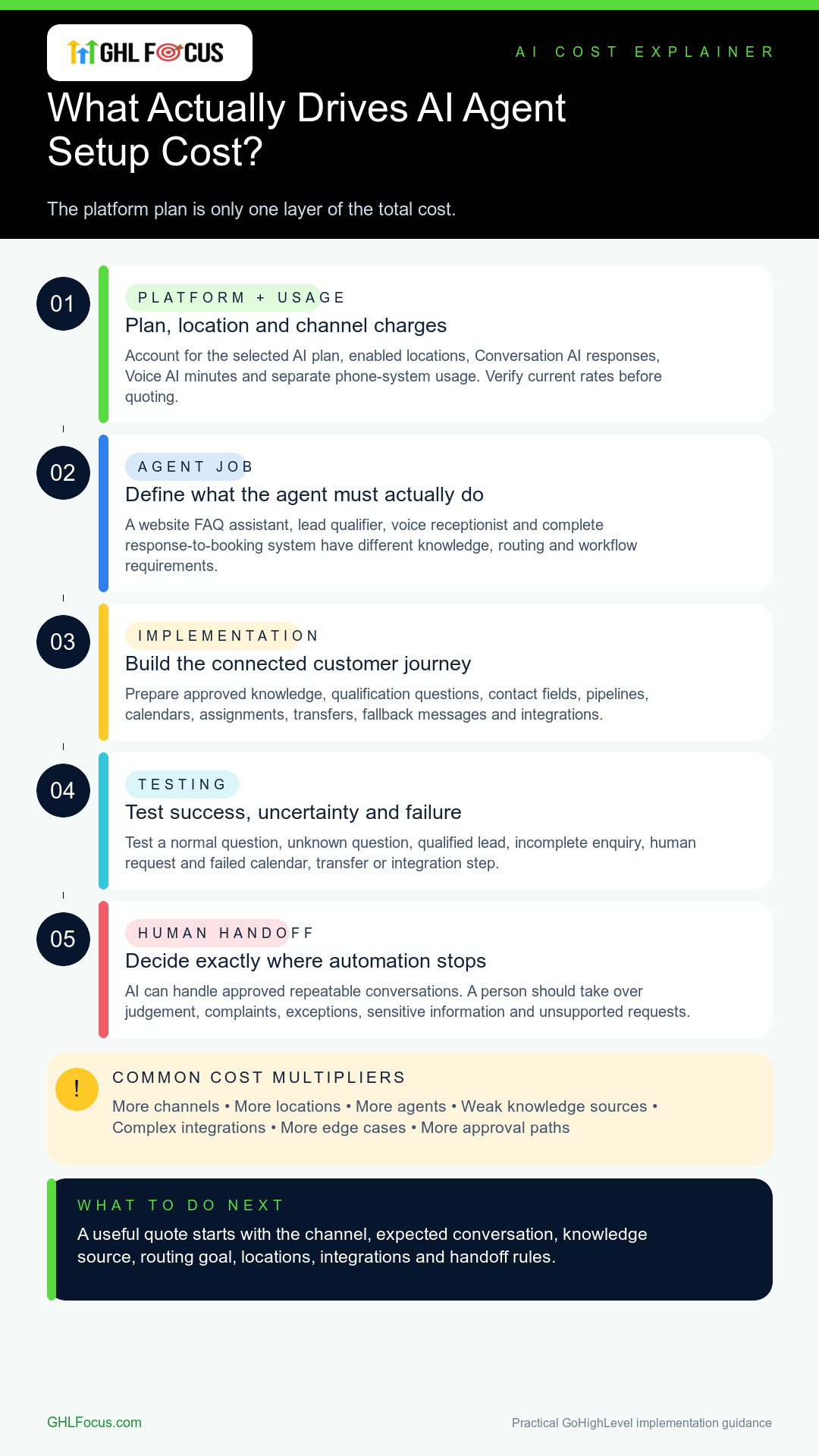
Start by choosing the job
An “AI agent” can mean several different systems.
- Website chatbot: answers approved questions, collects details and guides a visitor toward the next step.
- Conversation AI: responds through supported messaging channels and can continue lead qualification.
- Voice AI: answers or places calls, asks approved questions and can book or transfer when configured correctly.
- Lead-response system: connects forms, calls, messages, pipeline updates, booking and human follow-up.
If the goal is only “use AI,” the scope is not ready. Start with the missed call, slow response, repetitive question or booking gap you want to fix.
What does HighLevel charge for AI?
HighLevel currently offers pay-per-use, AI Employee Growth and AI Employee Unlimited options. Its official pricing document, updated June 9, 2026, lists Growth at $50 per month per enabled location and Unlimited at $97 per month per enabled location.
Growth includes monthly Conversation AI responses and Voice AI minutes, with overages billed separately. Unlimited is still subject to fair use. Phone System charges remain separate, and Agent Studio stays pay-per-use across the plans.
These platform rates can change. Confirm the current HighLevel AI pricing and the account’s billing settings before you quote a client or approve a rollout.
What changes the implementation cost?
- The number of channels, locations and agents.
- The quality and size of the approved knowledge source.
- The qualification questions and contact fields.
- Calendars, pipeline stages and assignment rules.
- Transfers, fallback messages and human handoff paths.
- Integrations with forms, websites, payments or external systems.
- The number of normal, failure and edge cases that must be tested.
A simple FAQ chatbot and a voice receptionist handling several services and locations should not receive the same quote.
Do not skip the human handoff
Every AI agent needs a clear point where automation stops. That may be a call transfer, assigned conversation, callback task or notification to a salesperson.
Look at it from the customer’s side. If the question involves judgement, a complaint, an exception, sensitive information or an unsupported request, the system should not pretend it knows the answer.
For connected chat and voice work, review our GoHighLevel AI chatbot and voice agent service. For a full response-to-booking journey, see the AI lead response and booking service. Businesses focused on inbound calls can review AI receptionist and missed-call recovery.
What should be tested before launch?
- A normal question the agent should answer.
- An unknown question it should decline or hand over.
- A qualified lead that should book or move forward.
- An unqualified or incomplete enquiry.
- A person asking for a human.
- A failed calendar, transfer or integration step.
A demo conversation is useful, but it is not launch proof. Test the real contact record, pipeline, calendar and notification path.
How should you request a quote?
Share the channel, expected conversation, knowledge source, booking or routing goal, locations, integrations and handoff requirements. That produces a useful scope. “Build me an AI employee” does not.
Frequently asked questions
Is the HighLevel AI plan the full setup cost?
No. The platform charge covers access or usage. Implementation, knowledge preparation, workflow logic, testing, monitoring and future changes are separate work.
Should I start with chat or voice?
Start with the channel where valuable conversations already happen. Website-led buyers may fit chat first. Call-heavy businesses may get more value from a receptionist or missed-call workflow.
Can an AI agent replace every human response?
No. Use AI for approved, repeatable conversations. Keep a real handoff for judgement, exceptions, complaints, sensitive situations and anything outside the verified knowledge.
Separate platform usage from implementation work
| Cost layer | What it covers | What changes the amount |
|---|---|---|
| HighLevel usage | AI plan or pay-per-use activity, models, voice engine, text-to-speech and phone charges | Locations, minutes, responses, models, voices and call length |
| Implementation | Conversation design, knowledge, fields, calendars, routing, workflows, tools and integrations | Channels, services, locations, actions and edge cases |
| Launch QA | Test calls or chats, failure handling, contact updates, booking, transfer and notifications | Number of scenarios and downstream systems |
| Ongoing operations | Transcript review, prompt or knowledge changes, failure analysis and reporting | Conversation volume, change frequency and support boundary |
A platform subscription is not a completed agent. The implementation quote should state which of these layers are included and which recurring charges the client will pay directly.
A quote-ready AI implementation brief
- Job: the one missed call, repetitive question, qualification or booking gap the agent must handle.
- Channel and direction: website chat, SMS, inbound voice, outbound voice or a defined combination.
- Audience: locations, services, languages, hours and exclusions.
- Approved knowledge: source pages, documents, owners and update process.
- Required actions: capture fields, qualify, book, transfer, create tasks, update opportunities or trigger workflows.
- Human handoff: when automation must stop, who receives the contact and what context they need.
- Integrations: calendars, phone, forms, payments or external systems.
- Test pack: normal, unknown, qualified, unqualified, human-request and failed-tool scenarios.
- Evidence and privacy: what can be logged, retained, reviewed and published.
Launch gate: evidence the agent is ready
| Test | Pass condition |
|---|---|
| Approved answer | The answer is grounded in the approved source and does not add unsupported policy or pricing |
| Unknown request | The agent declines, clarifies or hands off instead of guessing |
| Qualification | Required fields reach the correct contact and remain visible to the team |
| Booking | The correct calendar, time zone, confirmation and opportunity action occur |
| Human request | Transfer, assignment or callback works with the conversation context |
| Failure path | A failed calendar, integration or transfer produces a controlled fallback and alert |
| Stop condition | Automation stops or changes after reply, booking, opt-out or escalation as designed |
What do these tests tell you? They show whether the agent can complete the agreed conversation and hand the contact to your team. They do not show how many bookings or sales it will generate. We have not published client-approved AI-agent booking or revenue results; those need to be measured after launch.
Choose the smallest useful AI starting point
- Website visitors ask repetitive questions: start with a narrow chatbot and human escalation.
- Inbound calls are missed: start with one receptionist path, one calendar and one transfer rule.
- Leads wait too long after submitting: connect one lead source to qualification, booking and salesperson handoff.
- Several services or locations need different logic: map and test the routing before adding more prompts.
Need your AI agent set up and tested?
We can scope your conversation, booking path, follow-up and human handoff, then test the agreed customer journey. Implementation is quoted separately from software subscriptions and usage charges.