
How to Monitor GoHighLevel Workflow Errors Across Client Sub-Accounts
Which client account needs attention first when several workflow errors arrive together? A failed lead response needs a different priority from a missing optional field. If you manage several GoHighLevel sub-accounts, your monitoring process needs to make that distinction before anyone starts editing.
The difficult part is not finding one error. It is building a process that tells the right person which sub-account failed, what to inspect and who owns the fix.
What the error notification gives us
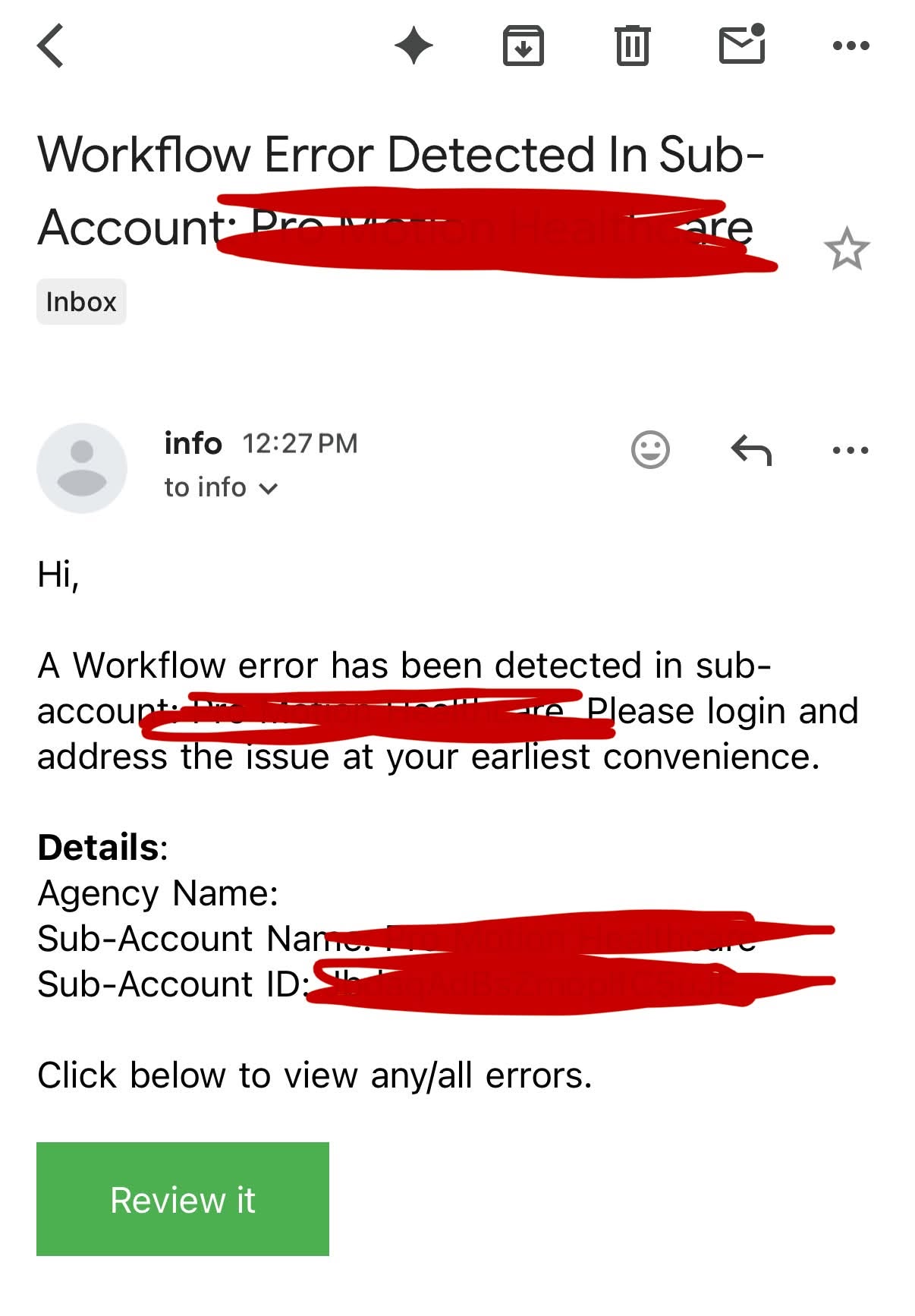
A useful workflow error email should identify the agency, sub-account and sub-account ID, then provide a direct route to review the problem. The screenshot shows that structure with a Review it button.
HighLevel’s workflow error notifications are configured inside each workflow’s settings and are off by default. Recipients can be selected from users in the account. HighLevel sends a summary email once every 24 hours when new errors are found, so email is an alerting layer, not a complete monitoring system.
Our error-monitoring process
1. Route alerts to an owner
We avoid sending every error to every person. One primary owner receives the alert, and a backup owner is defined for urgent accounts. If nobody owns the queue, the email becomes background noise.
2. Open Needs Review and execution logs
The email tells us that an error exists. The Needs Review area and execution logs tell us where the action failed and which contact was affected.
We check the failing action, the contact record, the input data and the time of the failure before changing the workflow.
3. Classify the impact
We use three practical levels:
- Urgent: active lead response, payment, appointment or customer communication is blocked.
- Important: reporting, tagging or internal routing is incomplete, but the customer journey can continue.
- Low impact: a test contact, old record or optional action failed without affecting a live journey.
This keeps the team from treating a missing optional field like a failed appointment workflow.
4. Look for a pattern
One contact can fail because its data is unusual. Ten contacts failing at the same action usually point to a workflow, integration or permission problem.
We compare recent executions before editing. The pattern often tells us whether to fix the contact data, reconnect an integration or change the workflow logic.
5. Test the repaired path
After the correction, we run a controlled test through the same branch. We verify the action result, the contact timeline and the next workflow step. A green workflow screen is not enough if the intended message, status or notification still did not happen.
6. Acknowledge and document
HighLevel lets the team acknowledge reviewed errors. We also record the cause, fix and affected sub-account in a simple maintenance log. This prevents the same issue from being investigated from zero next month.
What we do not recommend
- Do not rely on one person’s inbox as the only record.
- Do not clear errors before confirming the customer impact.
- Do not edit a shared workflow without checking recent executions.
- Do not send all notifications to the entire team.
- Do not assume the same error has the same cause in every sub-account.
A simple weekly agency routine
For managed client accounts, we combine immediate alerts with a short weekly review:
- open the error queue for active sub-accounts;
- group repeated failures by workflow and action;
- confirm urgent fixes were tested;
- record reconnects, permission changes and workflow edits;
- flag accounts that need a deeper audit.
This is not exciting work, but it protects the automation clients are paying you to maintain.
If your team needs ongoing coverage across several client accounts, our GoHighLevel agency support service gives that monitoring and technical ownership a clear home.
Primary technical reference: HighLevel workflow error notifications.
Need this fixed for you?
Start with a $149 small fix for one clearly defined issue, subject to scope confirmation. If the cause is unclear or spans several workflows, choose the $200 workflow audit. The audit report is delivered within five business days after we receive the required access and journey details.
One Comment