
HVAC Missed Calls After Hours: Triage and Book the Right Job
Your HVAC dispatcher should not have to replay every overnight voicemail just to work out which job needs attention first. The caller needs an immediate acknowledgement, a few careful triage questions and one clear next step. That next step may be emergency guidance, a human escalation, a correctly matched service appointment or a scheduled callback.
The important word here is triage. An AI receptionist or workflow can collect information and route the call. It should not diagnose equipment, tell somebody a dangerous situation is safe or promise an arrival time your team cannot meet.
How I would judge the setup: When the office opens, can your dispatcher see the problem, service address, route taken and person responsible for the next action? That is the handoff we are building toward.
HighLevel can help connect missed-call text-back, Voice AI, calendars, contact records and team notifications. But the quality of the result depends on the routing rules you give it. If you are still deciding how much of the phone journey to automate, our guide to testing GoHighLevel Voice AI shows the practical test process before a live launch.
What should happen when an HVAC call arrives after hours?
Look at it from the caller’s side. They may have no cooling, no heat, a leaking unit or a system making a worrying sound. They do not want a long sales conversation. They want to know that the call was received and what happens next.
This route is simple on purpose. Every extra question increases the chance that a worried caller hangs up. Ask only what changes the next action.
Start with the questions that actually affect the route
ServiceTitan’s HVAC call-script guidance recommends collecting the problem, how long it has been happening, equipment details, property information and the customer’s contact details. That is a good operational starting point, but I would divide the questions into two short stages.
Stage 1: check for a safety-sensitive situation
The first questions should identify whether automation needs to stop. For example:
- Is a carbon monoxide alarm sounding?
- Do you smell gas, burning or smoke?
- Is there an active electrical hazard or fire?
- Is anybody in immediate medical danger because of the temperature?
Your wording and emergency instructions must be approved by the business. When a safety trigger is present, the system should clearly direct the caller to the appropriate emergency service or utility and notify the on-call person if that is part of your real process. It should not continue into routine booking as if nothing happened.
Stage 2: collect the minimum booking context
If no emergency exit is needed, collect:
- Name and reliable callback number.
- Service address and whether the property is residential or commercial.
- The main problem, such as no cooling, no heat, leaking, unusual noise or maintenance.
- When the problem started and whether the system is completely down.
- Equipment type or number of systems, if the caller knows.
- Access restrictions and the best available service window.
You can collect more later. The after-hours call is not the place to force the customer through a complete equipment survey.
Use four routing buckets instead of one generic calendar
This is where many implementations go wrong. The agent sounds helpful, but every caller receives the same booking link. That creates bad appointments for the office to repair later.
- Safety-sensitive: stop routine automation, give the approved emergency instruction and alert the correct human.
- Urgent service: create the on-call handoff or offer only the service windows your team has reserved for urgent work.
- Standard repair or maintenance: offer a normal service calendar that respects territory, duration, capacity and technician requirements.
- Replacement or estimate enquiry: route to the comfort-advisor or estimate process instead of a repair slot.
HighLevel’s current Voice AI appointment-booking documentation explains that the agent can book against calendar availability and, depending on the setup, route across eligible calendars. Your calendar rules still control availability, buffers, minimum notice and conflicts. The AI should not invent capacity that the calendar does not have.
What should the missed-call text say?
If nobody or no voice agent answers, send one useful text. HighLevel’s missed-call text-back guide confirms that the feature can acknowledge missed callers immediately. It also warns that repeated missed calls can trigger repeated messages, so test and control that behaviour before launch.
Thanks for calling [HVAC Company]. We are currently closed, but I can help route your request. If there is smoke, a gas smell, a carbon monoxide alarm or immediate danger, contact the appropriate emergency service now. Otherwise, reply with your service address and tell us whether you have no cooling, no heat, a leak or another issue.
That message identifies the business, sets a truthful expectation and gives the customer a way to continue. It does not pretend that a technician has already been dispatched.
Test the phone experience before real customers use it
I would not approve an HVAC voice agent after one friendly test call. Run the situations that are likely to expose a bad route: a carbon monoxide alarm, a caller who does not know the equipment type, an address outside the service area, a fully booked urgent calendar and an existing customer asking about a previous visit.
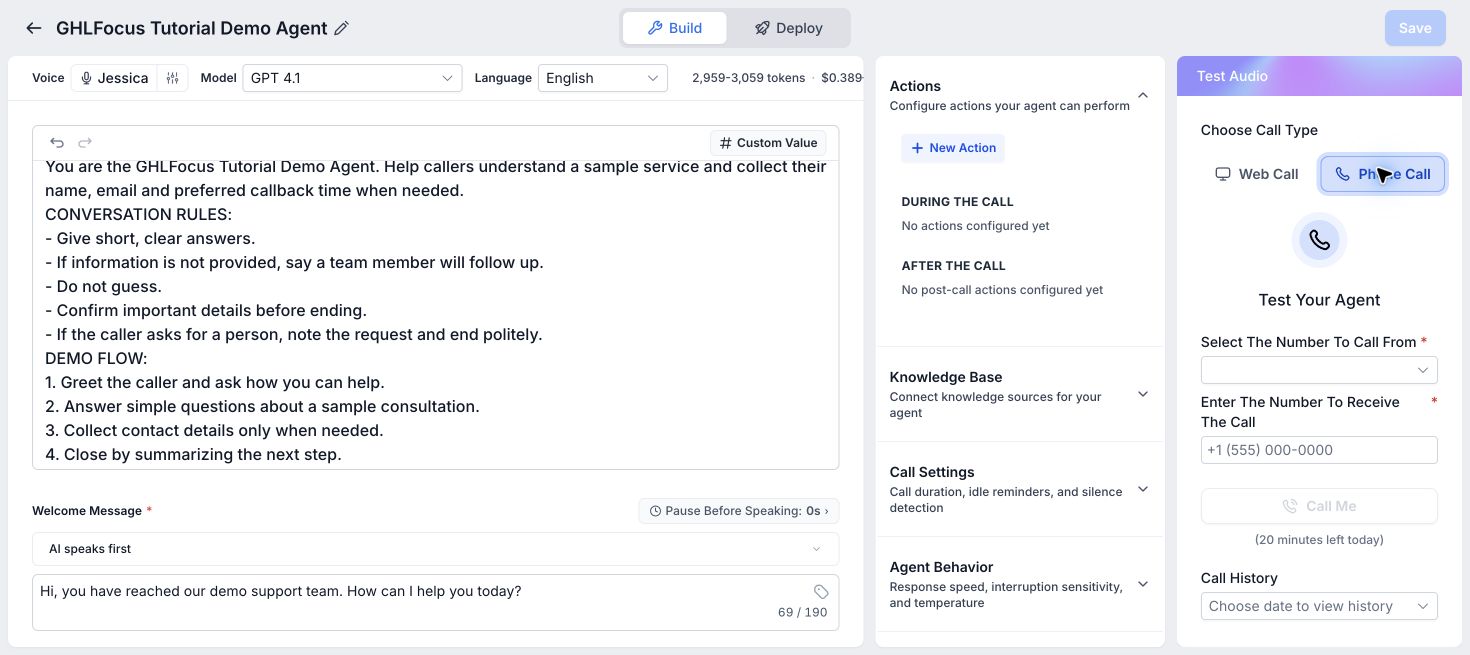
HighLevel also documents web-call and phone-call testing. A browser test is useful for prompt changes, but a phone test is the better final check for the actual telephony experience.
The morning handoff should already answer the dispatcher’s first questions
When the team opens, the contact record should show:
- Caller name, number, source and service address.
- The customer’s own description of the problem.
- Any safety-sensitive answer and the action the system took.
- Property and equipment context that affects the job.
- Appointment status or requested callback window.
- The assigned owner and a clear due time.
- The transcript or conversation history where available.
The dispatcher should be able to confirm or adjust the job without asking the customer to repeat the whole call.
If this were my HVAC business, I would build it in this order
- Write the approved safety exits and human escalation policy.
- Define the four routing buckets and who owns each one.
- Connect the correct calendars and urgent-service capacity.
- Write the short voice and text questions.
- Create the contact, opportunity, task and internal notification rules.
- Test normal, urgent, unsafe, out-of-area and fully booked scenarios.
- Review the first live calls and improve the weak points.
You do not need to automate every HVAC conversation on day one. Start by making the after-hours route safe, honest and useful. Once that works, you can improve estimate follow-up, maintenance reminders and review requests without rebuilding the foundation.
HVAC missed-call FAQs
Can an AI receptionist decide whether an HVAC problem is an emergency?
It can ask approved triage questions and route based on the answers, but it should not diagnose the equipment or independently declare a dangerous situation safe. Safety-sensitive answers need clear emergency guidance and, where appropriate, a human escalation.
Should every after-hours HVAC caller receive a booking link?
No. Safety-sensitive, out-of-area, unclear and fully booked situations may need a human callback instead. Only offer a calendar when it matches the job type, territory and real availability.
What should an HVAC missed-call text collect?
Start with the service address, main issue and a reliable callback number. Add only the questions that change urgency, routing or booking. Do not turn the first text into a long diagnostic form.
Can GoHighLevel book an HVAC service appointment during a voice call?
HighLevel Voice AI can book appointments when the agent and calendar are configured correctly. Your team still needs to set the right availability, duration, buffers, territory and service rules, then test the complete call path.
Are after-hours HVAC calls reaching the right person?
We can map missed-call response, job qualification, booking and dispatcher handoff around your HVAC coverage and the jobs your team can accept. Book a free 30-minute call to discuss your current process.
Related GHLFocus guides: after-hours lead-response system · AI receptionist and missed-call recovery service · workflow audit and repair service.
2 Comments