GoHighLevel Voice AI Languages: Supported Languages and Setup
GoHighLevel Voice AI supports a broad set of languages, but language support alone does not guarantee a natural agent. The selected voice, greeting, prompt, knowledge sources and test method all need to match the audience.
Quick answer: Choose the agent language inside AI Agents and Voice AI, then select a compatible voice. Review the translated greeting, keep language instructions out of the main prompt unless a special rule is required, and run both a web call and phone test.
Supported GoHighLevel Voice AI languages
The current language list includes:
English, German, Spanish, French, Portuguese, Italian, Dutch, Hindi, Japanese, Polish, Romanian, Turkish, Vietnamese, Swedish, Norwegian, Russian, Indonesian, Greek, Danish, Finnish, Chinese, Korean, Slovak, Bulgarian, Malay, Hungarian, Arabic, Tamil, Ukrainian, Filipino, Czech, Croatian, Afrikaans, Armenian, Azerbaijani, Bosnian, Galician, Hebrew, Icelandic, Kannada, Kazakh, Latvian, Lithuanian, Macedonian, Marathi, Nepali, Persian, Serbian, Slovenian, Swahili, Thai, Urdu and Welsh.
A Multilingual option is also available for supported use cases. HighLevel lists more than 80 voices across providers, but every voice is not available in every language.
How to change a Voice AI agent’s language
- Open the correct subaccount.
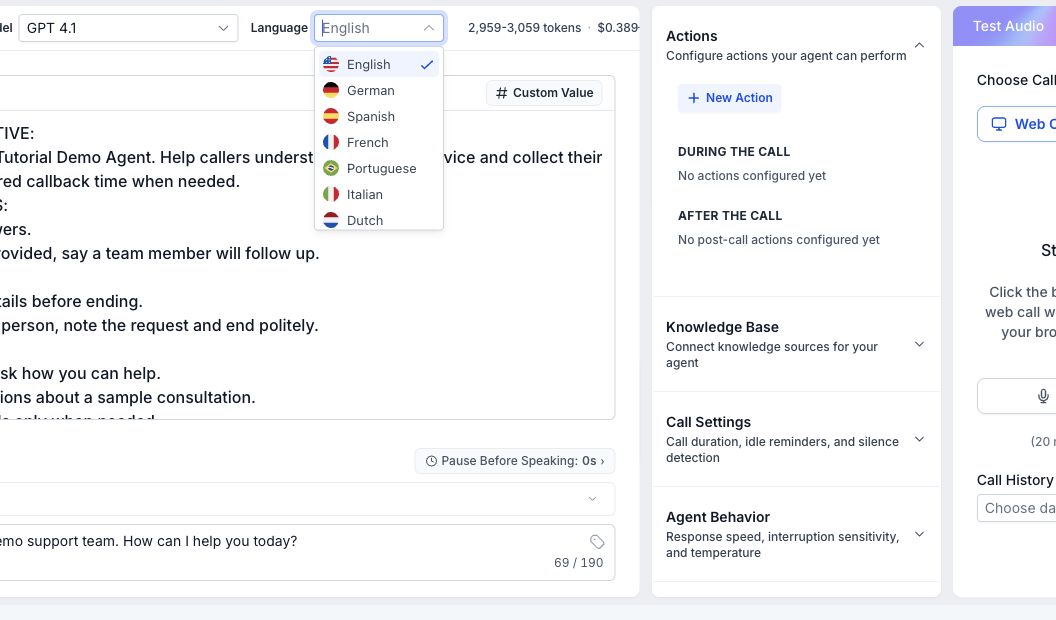
- Go to AI Agents, then Voice AI.
- Create a new agent or edit an existing agent.
- Open the language and voice settings.
- Select the required language.
- Choose a voice that is available for that language.
- Review the greeting and save the agent.
Do not duplicate the language instruction
When the agent language is configured in the language setting, avoid adding a conflicting instruction such as “always speak Spanish” inside several prompt sections. Duplicate rules can create inconsistent behavior when the conversation changes direction.
Use the main prompt for the agent’s role, approved information, qualification rules, booking logic and human handoff. Use the language setting for the primary language.
Review the greeting after changing language
The greeting is the first part of the call, so verify it rather than assuming the translation is ready. Check the business name, product terms, place names and any compliance disclosure. A correct translation can still sound unnatural when read by the wrong voice.
How to test a multilingual Voice AI agent
- Run a web-call demo for fast prompt and pronunciation checks.
- Ask the same question using formal and conversational wording.
- Test numbers, dates, addresses, names and industry terms.
- Interrupt the agent and confirm it continues in the correct language.
- Test an unknown question and the human-handoff path.
- Run a phone test to check real audio quality.
- Confirm follow-up SMS or email content uses the intended language too.
Common language setup problems
- The voice is missing: The selected provider may not support that voice in the chosen language.
- The agent switches language: Conflicting prompt instructions or multilingual content may be confusing the agent.
- Names are mispronounced: Test alternate spellings or a different compatible voice.
- Booking sounds correct but fails: Check the calendar, timezone and workflow independently.
- Follow-up is in the wrong language: Voice settings do not automatically rewrite every SMS and email workflow.
GoHighLevel Voice AI language FAQs
Can one Voice AI agent speak multiple languages?
A Multilingual option is available, but test the exact language combination and voice carefully before using it with live leads.
Are all voices available in every language?
No. Voice availability varies by provider and language.
Should I translate the knowledge base?
For reliable answers, provide clear source content in the language the agent will use, especially for product terms and policies.
Will changing the voice language translate my workflows?
No. Review related SMS, email, calendar and handoff messages separately.
Need your AI agent set up and tested?
We can scope your conversation, booking path, follow-up and human handoff, then test the agreed customer journey. Implementation is quoted separately from software subscriptions and usage charges.
Try the agent with the language your leads actually use
Test pronunciation, interruptions, booking and handoff before the number is promoted.
Affiliate disclosure: GHLFocus may earn a commission at no extra cost to you if you sign up through this referral link.