
How to Build an AI Appointment Setter in GoHighLevel With Human Handoff
If I were building an AI appointment setter in GoHighLevel, I would give it three jobs: answer approved questions, identify whether the lead fits and book the correct calendar. I would also decide exactly when it must stop and hand the conversation to a person.
The biggest mistake is treating the AI like an unrestricted salesperson. We get a stronger system when the job is narrow, the knowledge is controlled and the handoff rules are decided before launch.
Simple architecture: capture consent, start the AI on supported channels, qualify with a few necessary questions, check live availability, book the right calendar, confirm the appointment and transfer sensitive, unclear or high-value conversations to a human.
Build the setter around the complete post-booking workflow, not just the appointment action. The receptionist versus chatbot comparison helps choose the entry channel, while the after-hours response guide and AI Employee pricing cover delivery and cost.
First, decide exactly what the AI can handle
Write a short scope before opening the bot settings. For example, the AI may answer service questions, ask the service area and project type, offer appointment times and confirm the booking. It should not invent pricing, promise availability or give regulated advice.
Use a clear success event. For an appointment setter, success is normally a confirmed calendar booking or a documented human handoff, not the number of messages sent.
How to build an AI appointment setter in GoHighLevel
- Choose the entry channels. Decide whether the agent will respond through web chat, SMS, Facebook, Instagram or another supported channel. Test each channel separately.
- Connect a clean knowledge source. Give the AI accurate service details, locations, business hours and frequently asked questions. Remove outdated offers and conflicting instructions.
- Write the agent’s goal and limits. Tell it what information it must collect, what it may answer and what requires a human. Keep the prompt specific to the business.
- Ask only necessary qualification questions. Long interrogations reduce completion. Collect the minimum information needed to select the right calendar or team member.
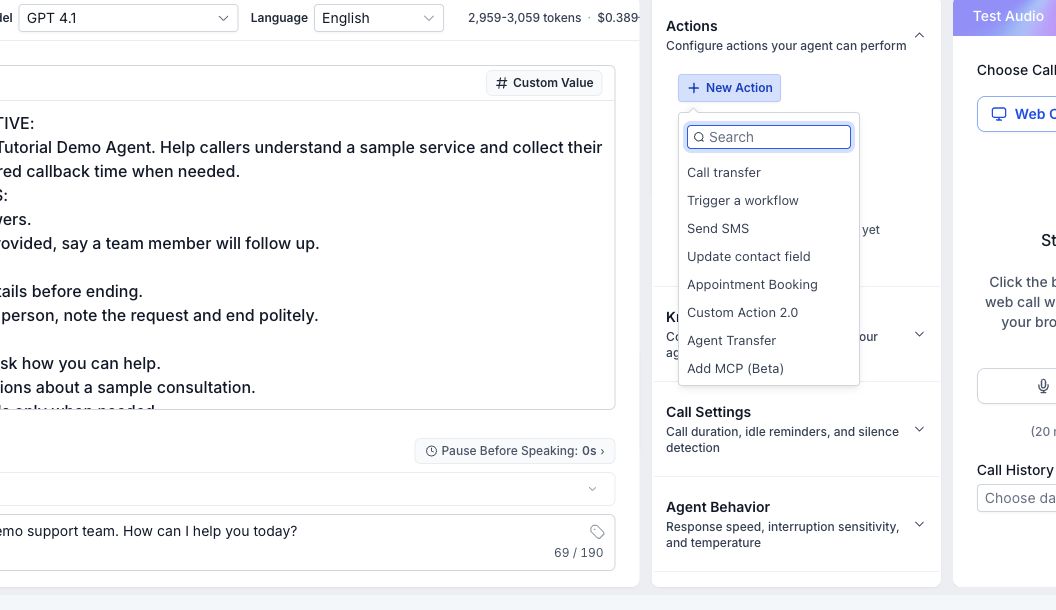
- Connect the correct calendar. Verify availability, timezone, slot duration, buffers and assignment rules. HighLevel supports appointment booking in Conversation AI, including multiple calendars in supported configurations.
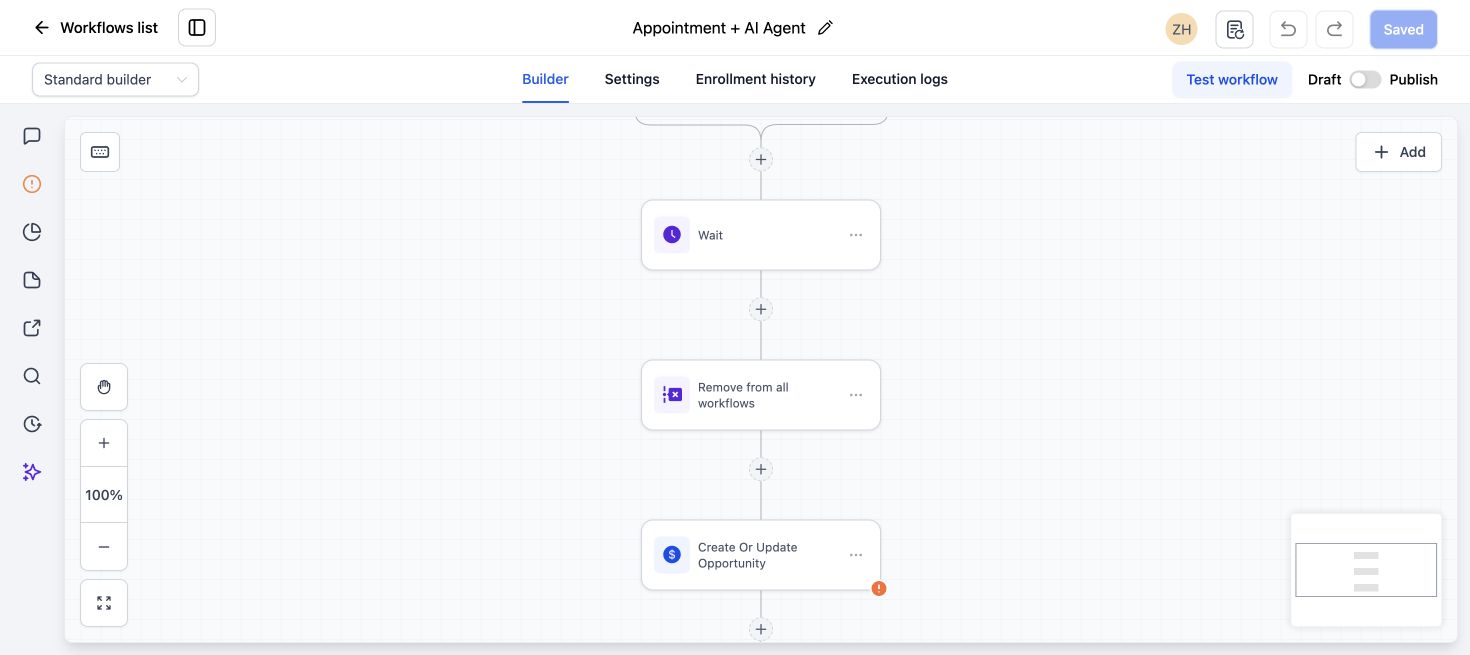
- Configure post-booking actions. Confirm the appointment, update the opportunity and alert the responsible user. The booking should enter the same reliable follow-up process as a manually booked lead.
- Add human handoff conditions. Transfer when the lead requests a person, expresses frustration, asks an unsupported question, disputes pricing or meets a high-value qualification rule.
- Test real conversations. Try incomplete answers, spelling errors, a request to reschedule, an unavailable location and a direct request for a human.
Human handoff is part of the product
Handoff should not be a generic message saying somebody will reply. Assign the conversation, notify the right person and preserve the qualification context so the lead does not have to repeat everything.
A practical handoff record includes the lead’s question, answers collected, desired service, appointment status and reason the AI stopped. If nobody owns the handoff, the automation has only moved the delay somewhere else.
When should the AI hand off?
- The lead explicitly asks for a person.
- The answer is not present in the approved knowledge base.
- The conversation involves a complaint, cancellation or billing dispute.
- The lead has unusual requirements that affect pricing or eligibility.
- The AI has asked for clarification and still cannot understand the request.
- The business has defined a high-value or urgent lead condition.
Do not hide the handoff. Tell the lead what will happen next and give a realistic response window. The AI should never pretend a human action has already happened.
How to measure an AI appointment setter
Track the full outcome instead of celebrating conversation volume. Review response time, qualified conversations, appointments booked, handoffs, no-show rate and the reasons conversations failed.
Read a sample of successful and unsuccessful conversations every week. This reveals missing knowledge, awkward questions and leads who were sent to the wrong calendar. Improve one issue at a time and retest it.
Common setup mistakes
Giving the AI too many goals
An agent that must support customers, sell several services, collect payments and book every calendar will be harder to control. Start with one journey.
Using an unfiltered knowledge base
More content is not always better. Conflicting pages and old pricing make the response less dependable.
Booking before qualification is complete
If the calendar is for a specific service area or customer type, verify those conditions before offering times.
Leaving handoffs unassigned
A notification in a busy inbox is not ownership. Assign the user and create the next action inside HighLevel.
For implementation help, see our AI lead response and booking service and GoHighLevel AI chatbot and Voice Agent service.
AI appointment setter FAQs
Can GoHighLevel AI book appointments?
Yes. HighLevel Conversation AI can book supported calendars when the bot, calendar and availability are configured correctly. Test the confirmed appointment event and the follow-up workflow before launch.
Can the AI use more than one calendar?
HighLevel supports multi-calendar booking in supported Conversation AI configurations. Use clear rules so the agent knows which calendar applies to each lead.
Should an AI appointment setter replace the sales team?
No. It is best used for fast first response, basic qualification, booking and organized handoff. People should handle exceptions, sensitive conversations and complex decisions.
How long should the qualification conversation be?
Ask only what is needed to route or book the lead. If the business requires a long discovery process, book a qualified call and let a person complete the deeper assessment.
Need your AI agent set up and tested?
We can scope your conversation, booking path, follow-up and human handoff, then test the agreed customer journey. Implementation is quoted separately from software subscriptions and usage charges.


2 Comments