
GoHighLevel Dedicated IP but Emails Still Go to Spam
Let me clear up one common assumption: a GoHighLevel dedicated IP does not guarantee inbox placement. Your emails can still go to spam when the new sending reputation, domain authentication, list quality or engagement is weak.
The expensive assumption: moving to a dedicated IP does not repair poor list quality, sudden volume spikes or weak authentication. We review the sending history and domain signals first so the next campaign does not damage the reputation further.
If emails started going to spam after moving to a dedicated IP, reduce volume and diagnose the sending setup before pushing more campaigns.
First, understand what a dedicated IP actually changes
On a shared IP, several senders contribute to the reputation. On a dedicated IP, your account owns the sending behavior. HighLevel’s current dedicated IP guide warns that low or inconsistent volume can make a dedicated IP a poor fit and that warmup still matters.
A dedicated IP is infrastructure. Inbox placement still depends on trust.
1. Check whether the IP was warmed gradually
A new IP has little sending history. Start with your most engaged contacts and increase volume in controlled stages. Do not move a large cold list onto the new IP on day one.
HighLevel’s email warmup guide recommends consistent sending, authenticated domains, validated addresses and close monitoring of complaints and engagement.
2. Verify the dedicated sending domain
Use a sending subdomain that belongs to the business, such as mail.example.com. Confirm it is connected to the correct GoHighLevel subaccount and shows as verified.
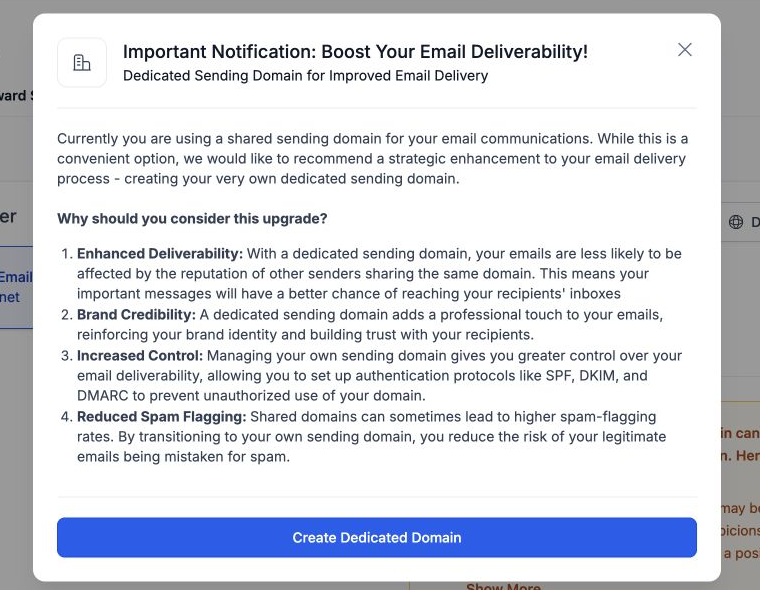
A dedicated IP with an unverified or mismatched sending domain does not create a trusted identity.
3. Check SPF, DKIM and DMARC
- SPF authorizes the sending service.
- DKIM signs the message and proves it was not changed.
- DMARC tells receiving providers how to handle messages that fail alignment.
Use one valid SPF record for the domain. Confirm DKIM passes and begin DMARC with a policy you can monitor safely. Authentication should align with the visible From domain.
4. Check reverse DNS and IP identity
Reverse DNS connects the sending IP to a hostname. HighLevel’s rDNS guide explains that it is different from the CNAME records used to connect a sending domain.
If the dedicated IP was provisioned through HighLevel, verify its status through the supported setup instead of creating conflicting DNS records yourself.
5. Measure list quality
Remove invalid, role-based and unengaged addresses. Never buy a list. A dedicated IP can lose trust quickly when the first campaigns generate bounces, spam complaints and almost no positive engagement.
Use email validation before sending and keep acquisition sources separate so you can identify which form or import is causing poor quality.
6. Make volume consistent
Large spikes followed by days of silence look less predictable than steady sending. If your business sends only a small newsletter occasionally, a reputable shared pool may perform better than a dedicated IP.
A dedicated IP is most useful when the account has enough permission-based volume to build and maintain its own reputation.
7. Check the content and sending pattern
- Use a recognizable From name and reply-to address.
- Keep the message relevant to what the contact requested.
- Avoid URL shorteners and suspicious redirect chains.
- Include a working unsubscribe link.
- Do not send the same aggressive promotion to every segment.
- Test links, images and plain-text balance.
8. Check engagement by provider
Separate results for Gmail, Microsoft, Yahoo and business domains. One provider may be filtering the mail while others accept it.
Use Google Postmaster Tools where eligible, review bounce and complaint codes, and test a real message with a mailbox-testing service. Do not judge deliverability only by sending to your own inbox.
9. Pause the source of damage
If one imported list or automated campaign has a high bounce or complaint rate, stop it. Continuing to send from a dedicated IP can make recovery slower.
Dedicated IP recovery checklist
- Pause cold or unverified segments.
- Confirm the dedicated sending domain and authentication.
- Check the IP and domain against reputable blocklist tools.
- Send first to recent, engaged contacts.
- Increase volume gradually and consistently.
- Monitor bounces, complaints, opens and replies by provider.
- Keep unsubscribe and preference handling simple.
For a broader account check, use our complete GoHighLevel email deliverability checklist. It covers the sending domain, authentication, list health and content before you decide whether the IP itself is the problem.
If deliverability problems overlap with account setup and workflows, see our GoHighLevel support services.
Frequently asked questions
Will a dedicated IP automatically improve GoHighLevel deliverability?
No. It isolates your sending reputation. Results improve only when authentication, volume, list quality and engagement are healthy.
How long does a dedicated IP take to warm up?
There is no safe universal number of days. Warmup depends on volume, consistency, engagement and provider response. Increase gradually based on real results.
Can low email volume hurt a dedicated IP?
Yes. HighLevel notes that inconsistent or insufficient volume can make a dedicated IP a poor fit.
Should I switch back to a shared IP?
Possibly, if your permission-based volume is too low to maintain a dedicated reputation. Diagnose the domain and list first so you do not carry the same problems to another IP.
Does DMARC fix spam placement?
DMARC improves authentication and domain protection, but it does not replace warmup, good lists, relevant content or positive engagement.
Need this fixed for you?
Start with a $149 small fix for one clearly defined issue, subject to scope confirmation. If the cause is unclear or spans several workflows, choose the $200 workflow audit. The audit report is delivered within five business days after we receive the required access and journey details.
2 Comments