
How to Handle Spam Contacts in GoHighLevel Without Deleting Real Leads
Spam contacts create a real operational problem in GoHighLevel. They fill pipelines, trigger workflows and waste message credits. But an aggressive cleanup workflow can create a worse problem by deleting a genuine lead that only had incomplete data.
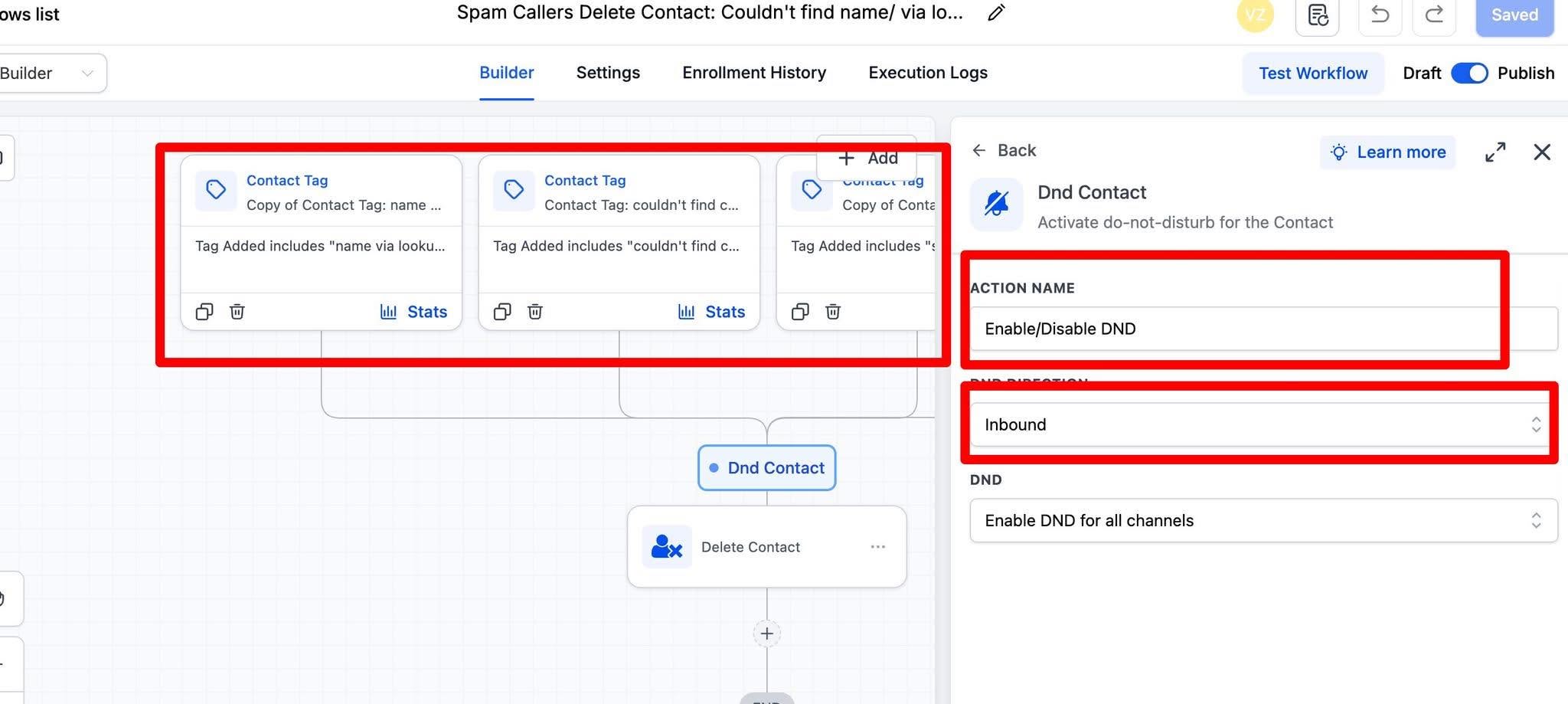
The screenshot below shows a workflow that reacts to spam-related tags, applies inbound DND and then deletes the contact. The first part is useful. The final delete action is where we slow down.
Why immediate deletion is risky
A contact can look suspicious because the name is missing, a phone lookup failed or a field contains unexpected text. None of those signals proves the person is spam.
HighLevel’s Delete Contact workflow action can remove the contact and end its workflow journey. Associated conversations, notes, tasks and activity data can also be lost. A deleted contact may be restorable for a limited period, but HighLevel warns that associated data may not return.
That is why we use a quarantine flow before deletion.
If the bigger issue is poor data entering a new account, our Business System Setup helps us fix the fields, workflow rules and pipeline structure before automation starts.
The safer spam-handling workflow
1. Tag the reason, not only the outcome
Use a specific tag such as spam-suspected-form-pattern, spam-suspected-call or invalid-contact-data. The tag should explain why the contact entered the flow.
A generic “spam” tag makes later review difficult and can hide a weak detection rule.
2. Require more than one signal
We do not delete because one field is empty. A safer condition can combine signals such as:
- a known spam source or repeated form pattern;
- invalid or obviously automated contact data;
- multiple submissions in an unrealistic time window;
- a manual spam tag from a team member;
- no legitimate conversation, appointment or opportunity history.
The exact conditions depend on where the contacts are coming from. Form spam, inbound call spam and imported junk data should not share one blind rule.
3. Use inbound DND to stop the immediate problem
HighLevel’s DND Contact action can apply DND by direction and channel. HighLevel specifically documents inbound DND as a way to block spam contacts from sending further inbound messages.
This lets the account stop the disruption without immediately destroying the record. We keep outbound settings separate so a team member can still decide what should happen next.
4. Remove the contact from active automation
For many accounts, removing the contact from workflows is safer than deleting it. It prevents follow-up messages and opportunity actions while preserving the timeline for review.
We also move or tag the contact outside normal sales reporting so the team is not counting it as a new lead.
5. Add a review window
We normally add a short wait or manual review step before deletion. During that window, we check for:
- a valid appointment;
- a real conversation;
- an assigned opportunity;
- recent team notes;
- another contact record that suggests a duplicate rather than spam.
6. Delete only when the evidence is strong
If deletion is still necessary, the final branch should require clear conditions. We test it with fake contacts first and verify that real leads with missing names, unusual phone formats or incomplete fields do not enter the delete branch.
A practical branch structure
- Spam signal or manual tag enters the workflow.
- Workflow checks for legitimate activity.
- If legitimate activity exists, notify a person and stop.
- If no legitimate activity exists, apply inbound DND and remove from active workflows.
- Wait for the review period.
- Delete only if the contact still meets the confirmed-spam conditions.
This structure is slightly slower than instant deletion. That is the point. It protects the data you may need when the detection rule is wrong.
Primary technical references: HighLevel DND Contact action and HighLevel Delete Contact action.
Need this fixed for you?
Start with a $149 small fix for one clearly defined issue, subject to scope confirmation. If the cause is unclear or spans several workflows, choose the $200 workflow audit. The audit report is delivered within five business days after we receive the required access and journey details.
One Comment