
How We Build a GoHighLevel Appointment Confirmation Workflow With Reply and Timeout Branches
“Can we move it to Friday?” is a reply, but it is not an appointment confirmation.
If your workflow treats every response as “yes,” it can mark the wrong booking as confirmed or continue sending reminders while someone is trying to reschedule. We need to separate a clear confirmation from a different request, then give silence its own follow-up path.
The workflow below uses reply and timeout branches so the automation can react differently to a response and to silence.
If you want the whole journey built around this logic, our GoHighLevel lead response and booking service connects the enquiry, follow-up, calendar and human handoff instead of treating them as separate pieces.
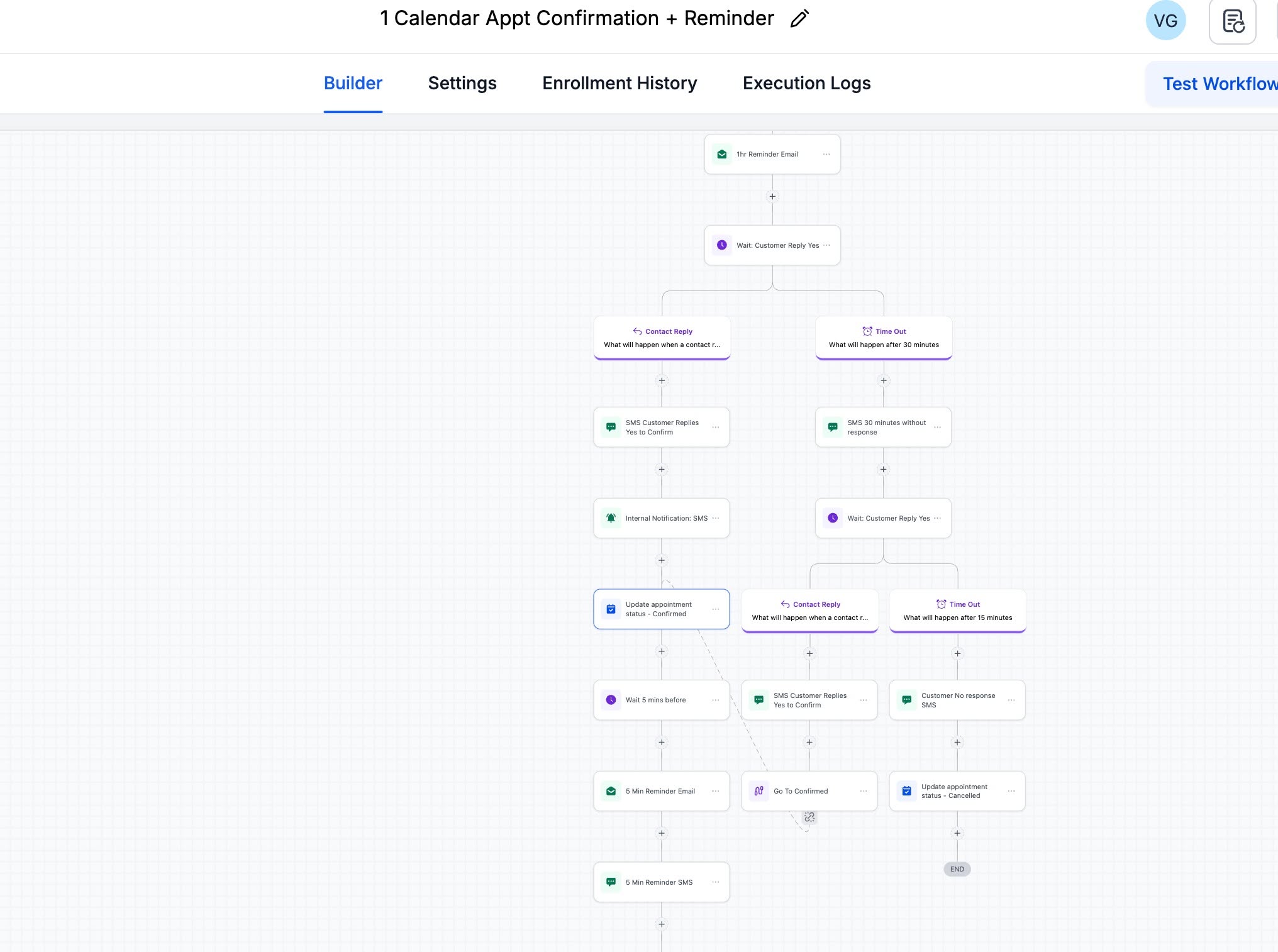
What the workflow is doing
The exact timing can change by business, but the structure is more important than the numbers.
- Send a reminder before the appointment.
- Wait for the customer to reply.
- Send the reply down one branch and a timeout down another.
- Update the appointment status when the response is clear.
- Notify the team when human attention is useful.
- Continue only with messages that still make sense.
Step 1: Send the first reminder
In this build, the workflow starts with a reminder email before the appointment. SMS can be added when the contact has given the required consent and the account is ready to send compliant messages.
The first reminder should make the next action obvious. If you need a confirmation, ask for one clear reply. Do not mix confirmation, rescheduling, payment and intake instructions in the same message.
Step 2: Wait for the customer reply
HighLevel’s Wait action can pause the workflow until a contact replies. It can also include a timeout. That timeout matters because the workflow needs a planned route for people who do not respond.
Without a timeout, a contact can remain paused indefinitely. With an aggressive timeout, the workflow can send another message before the customer has had a fair chance to answer. We choose the window based on how far away the appointment is and how quickly the team can react.
Step 3: Build the reply branch
When a qualifying reply arrives, the workflow can:
- send a short confirmation message;
- notify the assigned user or team;
- update the appointment status to Confirmed;
- move the contact to the correct follow-up path.
The important word is qualifying. A reply such as “Can we move it to Friday?” is not a confirmation. The reply logic should not treat every inbound message as “yes.” When intent is unclear, route the conversation to a person.
Step 4: Give the timeout branch a useful job
When no response arrives before the timeout, the workflow should not pretend the appointment is confirmed. It can send one follow-up, wait again and alert the team if the booking is valuable or time-sensitive.
In the screenshot, the no-response path continues through another wait and reply check. This creates a second chance without trapping every contact in endless reminders.
Step 5: Update the right appointment
HighLevel’s Update Appointment Status action can set a booking to Confirmed, Cancelled, Showed, No-show or Invalid. In an appointment-triggered workflow, it updates the appointment that triggered the workflow. In other workflow types, HighLevel may update the most recent appointment instead.
That detail is easy to miss. We test the workflow with a contact who has more than one appointment before using it on live bookings.
Step 6: Test every branch
We run at least four tests:
- a clear confirmation reply;
- a reschedule request;
- no reply before the timeout;
- a late reply after the timeout path has already started.
We also check for duplicate reminder workflows. Two correct workflows can still create a bad customer experience if both fire for the same appointment.
Why this structure is better than a reminder sequence
A reminder sequence only sends. A confirmation workflow listens, changes direction and keeps the calendar status useful. That is the difference between automation that looks busy and automation that helps the team make a decision.
Primary technical references: HighLevel Wait action and Update Appointment Status action.
Want this built for you?
Business System Setup starts at $997 for one defined customer journey, including calendar confirmations and reminders, SMS/email follow-up, basic missed-call text-back, testing and handoff. Review the full scope and exclusions before choosing it. Already built but broken? One clearly defined native HighLevel issue may fit the $149 small fix, subject to scope confirmation.
One Comment