Email Sending Is Blocked for This Account in GoHighLevel: How to Find the Cause and Restore Sending
If GoHighLevel says email sending is blocked, stop the campaigns before trying again. First identify whether the block came from bounces, complaints, unverified sending details, prohibited content or repeated provider rejections. Fixing the cause matters more than requesting an immediate unblock.
When we review a sending block, we begin with the account-level email statistics and the exact error. A block is normally a protection measure, not a random platform failure.
Quick answer: Open the affected sub-account and review email analytics, bounce reasons, spam complaints and domain authentication. Pause bulk sends, remove invalid or unengaged contacts, correct SPF, DKIM and DMARC, then follow the unblock option shown inside HighLevel. Do not resend the same campaign to the same list.
First, understand why HighLevel blocks email sending
HighLevel monitors signals that indicate whether recipients and email providers trust your messages. A temporary or permanent block can follow when those signals become unsafe.
| Signal | What it usually means | What to check |
|---|---|---|
| High bounce rate | Too many addresses do not exist or cannot receive mail. | Recent imports, old lists and form validation. |
| Spam complaints | Recipients did not expect the message or could not recognize the sender. | Consent source, sender identity and campaign frequency. |
| ESP blocks | Providers such as Google or Microsoft are rejecting the traffic. | Provider response codes, content and reputation. |
| Authentication failure | The sending domain is missing or failing required DNS records. | SPF, DKIM, DMARC and domain verification. |
| Volume spike | A new or quiet domain suddenly sent much more email. | Daily volume and recent campaign changes. |
HighLevel’s current email policies use progressive enforcement for repeated problems. That means restoring sending without changing the underlying practice can lead to a more serious restriction later.
How to diagnose the block
- Record the exact warning. Screenshot or copy the message before changing anything. Note whether it mentions account suspension, a provider block, an invalid domain or an individual delivery error.
- Check recent email statistics. Review delivery, bounce and complaint activity for the period immediately before the block. Compare normal sends with the campaign that caused the change.
- Open the bounce reasons. A hard bounce, temporary provider rejection and content-related rejection need different fixes. Do not treat every failed message as a bad address.
- Verify the sending domain. Confirm that the domain still passes SPF, DKIM and DMARC. DNS changes, duplicate records and an incorrect From address can break authentication after a setup previously worked.
- Trace where the contacts came from. Imported, purchased, scraped or very old lists are common sources of trouble. Confirm that every group has a clear permission source.
- Review the actual message. Check sender identity, subject line, links, unsubscribe option, physical address and whether the content matches what contacts agreed to receive.
How to restore sending safely
Pause every workflow and campaign using the same list
A scheduled campaign is not the only source of email. Workflows, appointment reminders and reactivation sequences may continue sending while you investigate. Pause the affected paths so the account does not create new failures.
Remove invalid and risky contacts
Suppress hard bounces and addresses that complained. Review contacts with no recent engagement and exclude groups whose consent cannot be verified. Do not simply export and reimport the same list.
Repair authentication and sender consistency
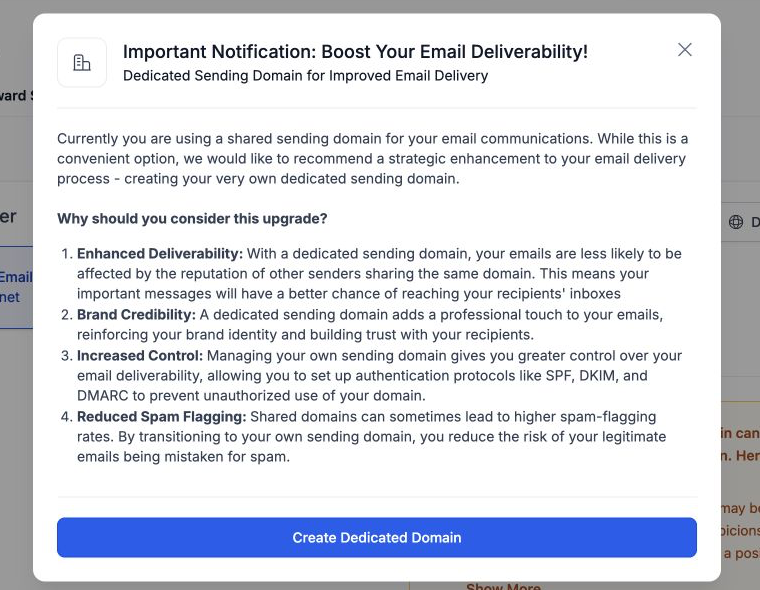
The visible From address should use the authenticated sending domain. Confirm DNS records in both HighLevel and your domain provider. If several departments send mail, keep sender names and domains understandable instead of constantly changing identities.
Follow the unblock process shown in the account
Use the available unblock or review option only after the fixes are complete. Explain what caused the issue and what changed. If the restriction is permanent or the interface does not provide a recovery option, contact HighLevel support with the sub-account, sending domain, dates and relevant error codes.
Do not create a new sending domain only to escape a block. Moving the same list and behavior to a fresh domain transfers the problem and can damage another domain.
What to send after access returns
Restart with a small group of recent, engaged contacts who clearly expect your email. Watch bounce and complaint signals before increasing volume. A restored account should not immediately resume the campaign that caused the restriction.
For wider inbox-placement problems, use our GoHighLevel deliverability checklist. It covers domain authentication, sender reputation, list quality and content checks in one practical sequence.
GoHighLevel email block FAQs
Is a GoHighLevel email block permanent?
Not always. Some restrictions are temporary and provide a self-service recovery path. Repeated or serious policy problems can lead to stronger enforcement, so read the exact account notice before taking action.
Can I continue sending one-to-one emails?
It depends on the type of restriction and sending provider. Test only after the account confirms access has returned. Do not use manual messages to bypass an active bulk-sending restriction.
Will changing the email content remove the block?
Content may be one factor, but blocks often involve list quality, complaints, authentication or volume. Review the full sending process rather than rewriting only the subject line.
Should I contact HighLevel support immediately?
First collect the error message, relevant dates, domain status and email statistics. Contact support when the notice requires it, no unblock option exists or the restriction remains after the documented fixes.
Need this fixed for you?
Start with a $149 small fix for one clearly defined issue, subject to scope confirmation. If the cause is unclear or spans several workflows, choose the $200 workflow audit. The audit report is delivered within five business days after we receive the required access and journey details.